


Student Web Host Manager by Education Host

Web hosting for students, run by the university.

Give every student on your web, WordPress, computing and digital media modules their own real cPanel hosting account. They sign in with their university login. Your team controls access around the academic year.

Microsoft Entra single sign-on Real cPanel, PHP, MySQL & WordPress Fully managed, UK-based since 2011
What is web hosting for students?

Hosting your institution provides, so every student builds on the same real server.

Web hosting for students is hosting space a university or college provides to each learner, so they can publish websites, WordPress sites and coursework on a real server. With Student Web Host Manager, every student gets their own cPanel account, signs in with their university Microsoft Entra login, and the institution controls access around modules, teaching blocks and marking windows. Education Host runs the infrastructure, backups and support.

Arden University Canterbury Christ Church University Atlantic Technological University
The platform

Everything a teaching team needs. Nothing it has to run.

An education-specific management layer on top of real cPanel hosting. Lecturers get visibility, IT gets governance, students get a production environment.

For students

One dashboard. One click into cPanel.

Students see every service they hold, open their hosting or cPanel in one click, work on group project sites, search the knowledgebase and raise a support ticket without leaving the page.

  • PHP, MySQL and WordPress ready on day one
  • Group project hosting alongside personal space
  • Cloud Pulse browser labs appear here where enabled
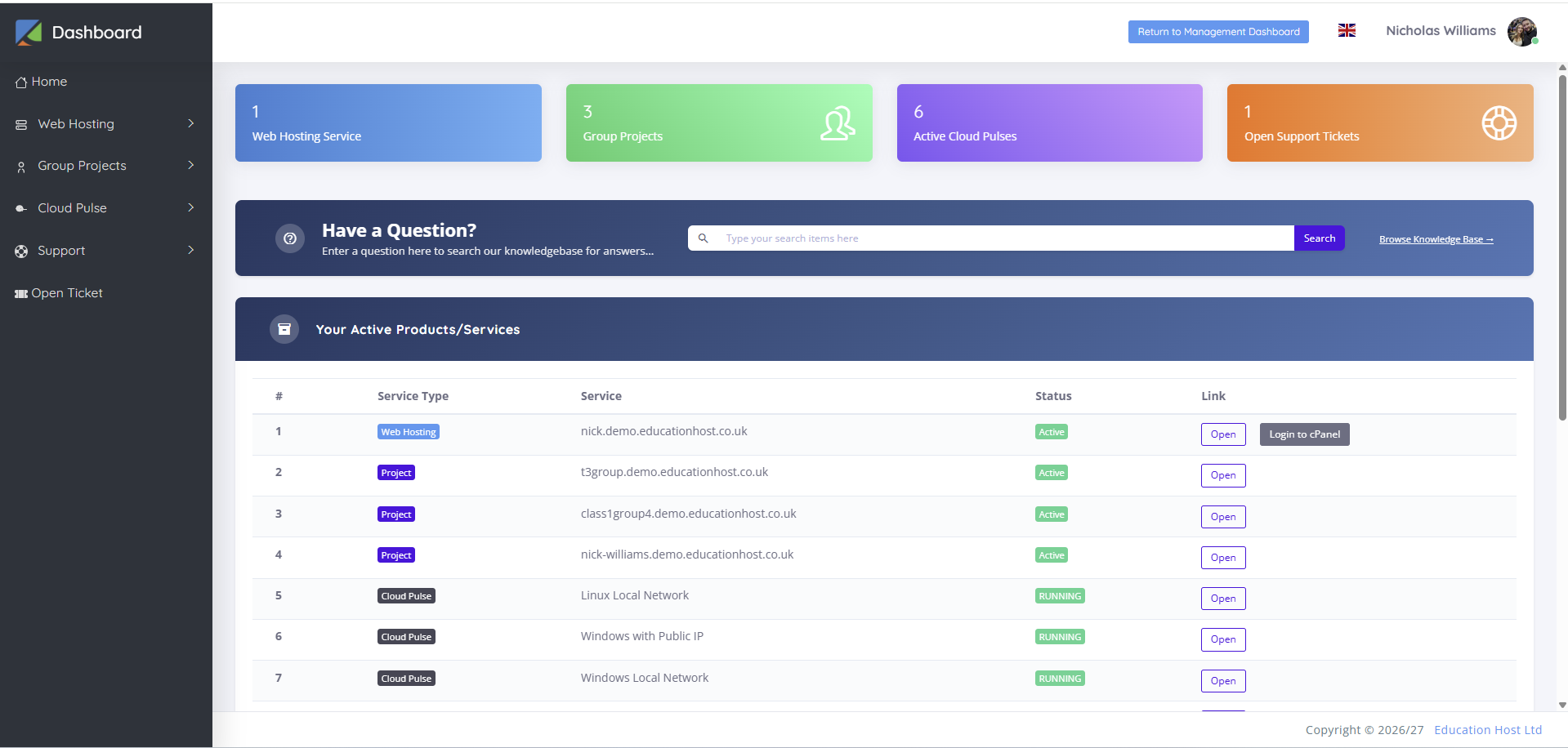
Student dashboard in Student Web Host Manager listing a web hosting service, three group projects, Cloud Pulse services and a support ticket, each with Open and Login to cPanel buttons
Student dashboard
For IT and digital learning

Lifecycle tied to the academic calendar.

Bulk import or sync enrolments. Module dates and teaching blocks drive access automatically. Suspend accounts during marking windows, archive at module end, reopen when a student returns.

  • Lifecycle states: active, restricted, archived, reopened
  • Campuses, courses, modules, teaching blocks and cohorts
  • Audit visibility and operational alerts across the estate
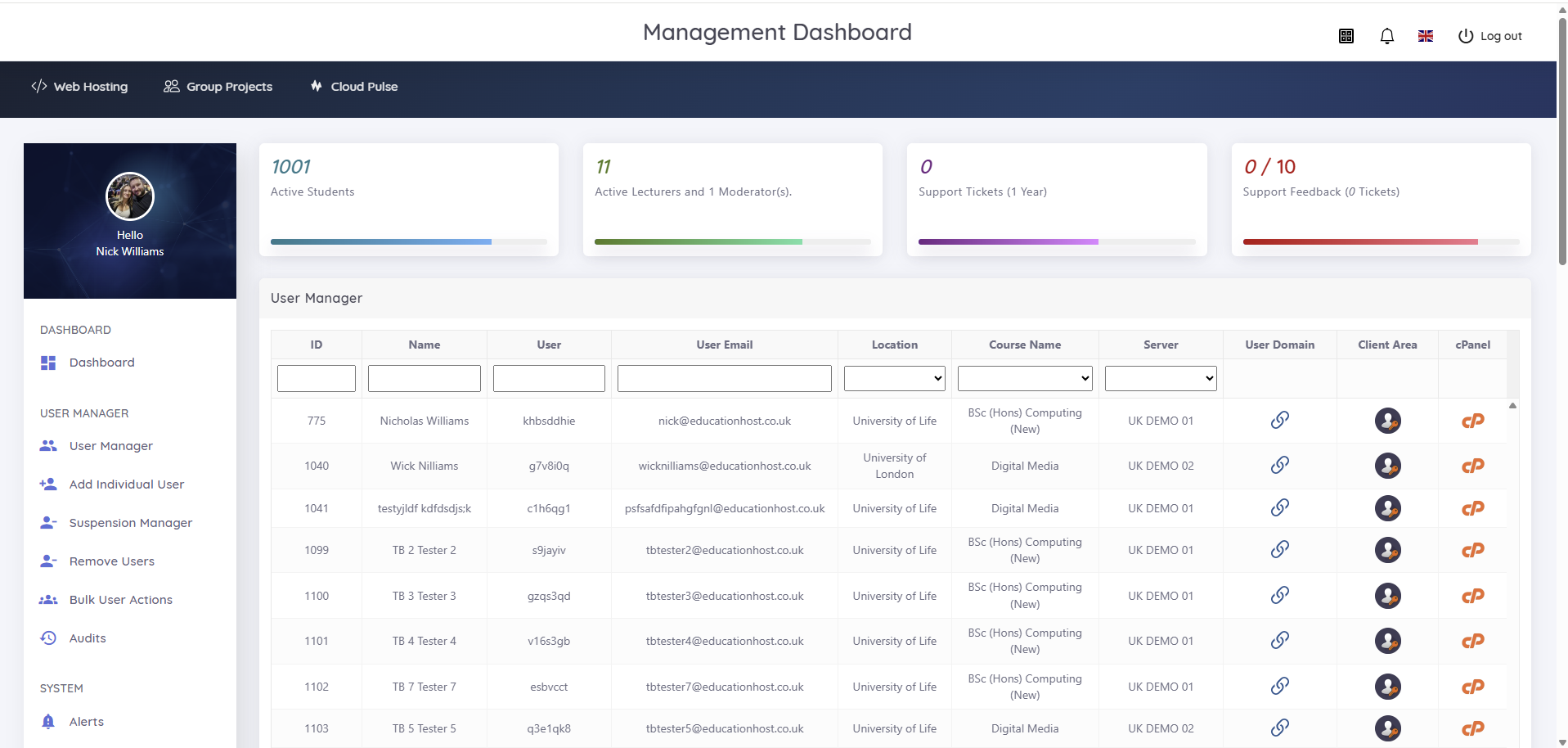
Management dashboard showing 1001 active students, 11 lecturers, and a searchable User Manager with course, server, client area and cPanel links per student
Management dashboard
For lecturers

See every student's site. Touch no servers.

A searchable User Manager covers students, courses, servers and domains, with a client-area and cPanel link beside each name. Lecturers get the visibility to support and mark work without infrastructure control.

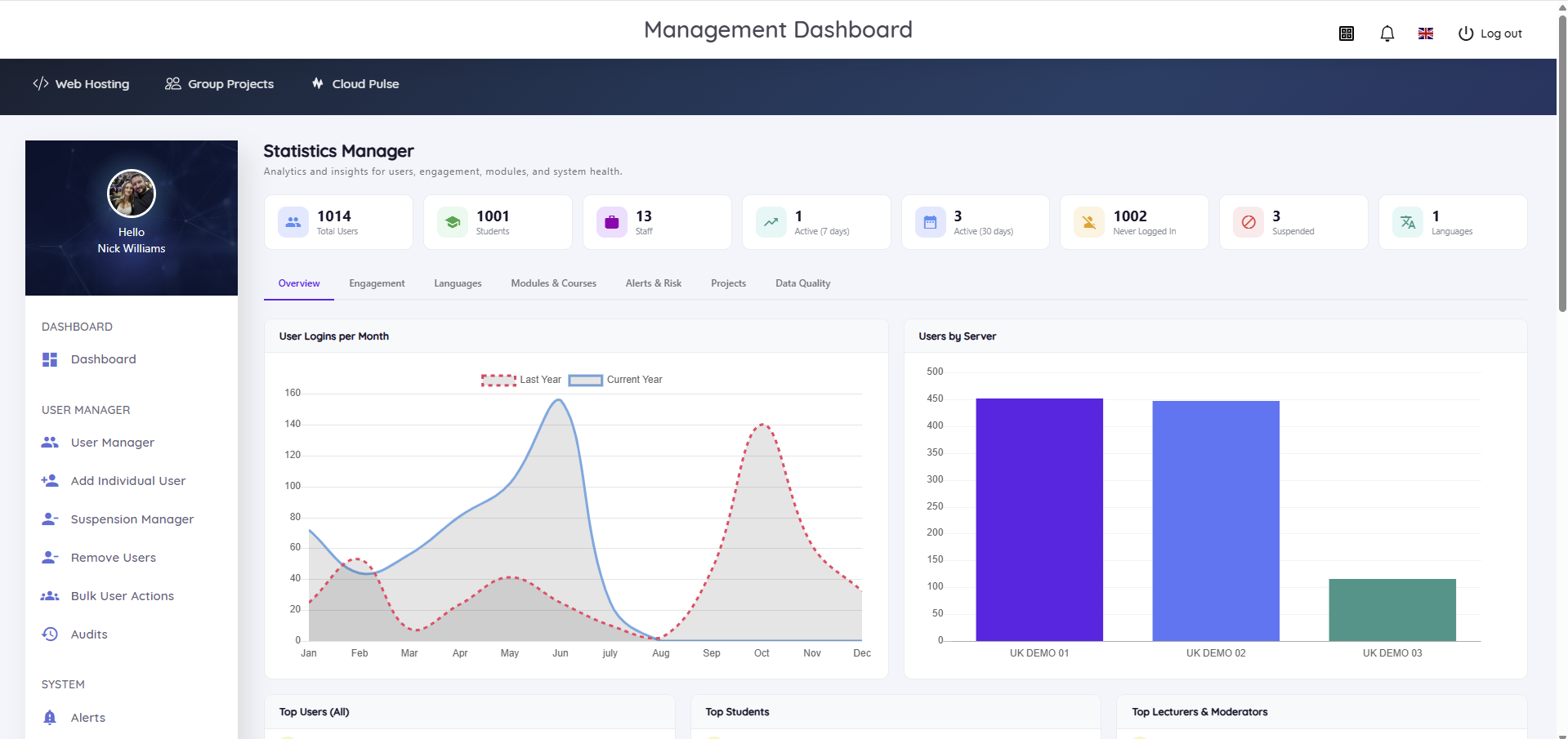
  • Statistics Manager: logins, 7 and 30-day active users, never-logged-in and suspended accounts
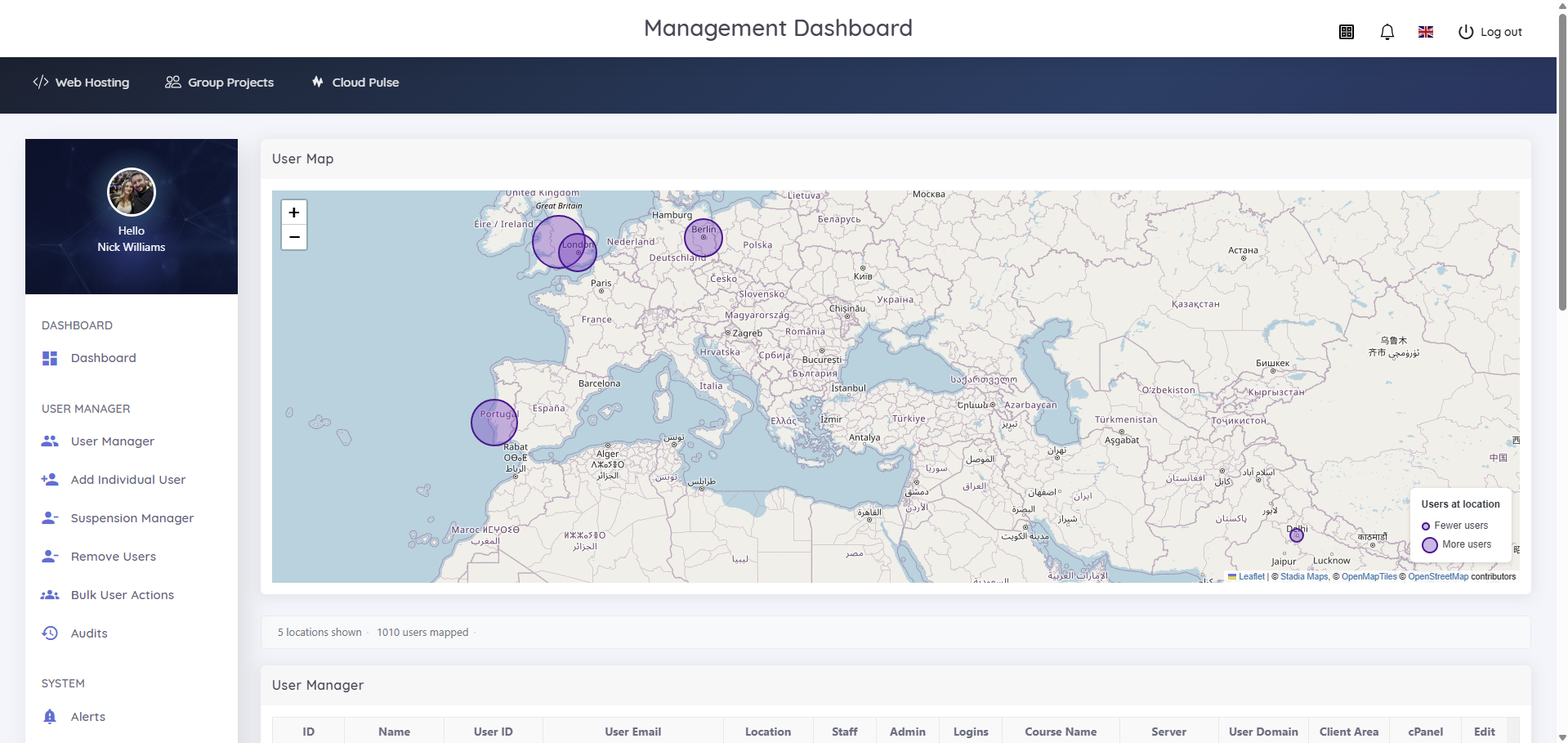
  • User Map shows where cohorts access the platform from
  • Role-based access aligned to courses and modules
Statistics Manager with login and engagement trends, active users over 7 and 30 days, suspended accounts and server distribution charts
Statistics Manager
Built on real cPanel

A proper hosting account, not a sandbox.

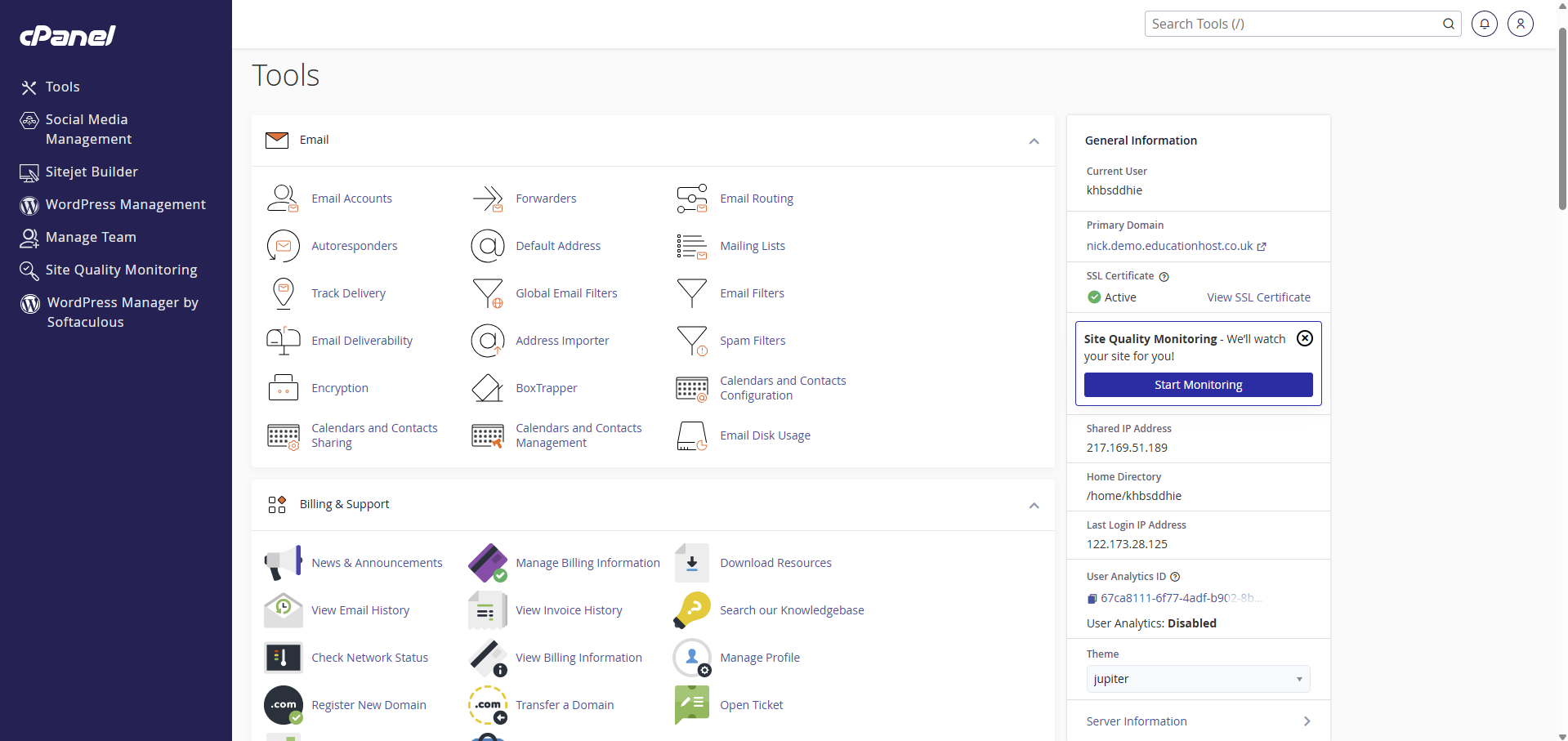
Students learn on the same tools they will meet in industry, under the institution's identity and governance.

Microsoft Entra single sign-on

Students and staff use existing university credentials. Role-based and conditional access policies stay yours.

PHP, MySQL and WordPress

Databases, WordPress management, a site builder, files, email accounts and forwarders on every account.

Institution-branded domains

Student sites live on your domain or subdomains, so work carries the university's name from the first upload.

Bulk import and sync

Load whole cohorts from your enrolment workflow, then let module dates and teaching blocks drive access.

Suspension Manager

Freeze accounts during marking windows or at module end, then archive, reopen or remove in bulk.

Fully managed service

Education Host handles backups, infrastructure and support. Your team never patches a server.

Analytics and delegation

Know who is building, where, and on which server.

Engagement data for programme leads, estate data for IT, and a world map of where your cohorts sign in from.

How it works

From set-up to a governed hosting estate in six steps.

  1. 01Your team

    Configure academic structures

    Campuses, courses, modules and teaching blocks mirror how you already teach.

  2. 02Your team

    Import or sync students

    Bulk import or sync from your enrolment workflow.

  3. 03Platform

    Provision hosting accounts

    Real cPanel accounts are created on Education Host servers automatically.

  4. 04Students

    Sign in with Entra

    University credentials, no separate hosting password.

  5. 05Students

    Build from the dashboard

    One click into cPanel, WordPress and group projects.

  6. 06Staff

    Monitor, suspend, archive

    Track engagement, freeze for marking, archive at module end.

Example lifecycle for one module's hosting accounts across an academic year
Trust

UK-based team. Accredited infrastructure.

Education Host has supported institutions across the UK, North America and Europe since 2011.

Cyber Essentials

Certified organisation.

ISO 27001

Accredited infrastructure.

Tier III-aligned

UK data centre, monitored 24x7x365.

Fully managed

Backups, infrastructure and support included.

Questions

Web hosting for students, answered.

What is web hosting for students?

Hosting space a university or college provides to each learner so they can publish websites, WordPress sites and coursework on a real server. With Student Web Host Manager, every student gets their own cPanel account, signs in with their university Microsoft Entra login, and the institution controls access around modules, teaching blocks and marking windows.

Why provide hosting instead of pointing students at free hosts?

Institution-provided hosting gives every student the same production-grade environment, keeps student data under the university's own identity and access policies, and lets lecturers see and support the work. Free consumer hosts vary in features, carry adverts, and leave staff with no visibility or control.

What can students build on their account?

Each account is real cPanel hosting with PHP, MySQL and WordPress ready to use, plus email, file management, databases and a site builder. It suits web development, full-stack, API and database coursework, WordPress teaching, digital business and marketing, and creative media modules, including group projects.

How do students log in?

With their existing university credentials through Microsoft Entra single sign-on. There are no separate hosting passwords to issue or reset, and institutions can apply their own role-based and conditional access policies.

What happens at the end of a module or course?

Access follows module dates and teaching blocks. Staff can suspend accounts during marking windows, archive them when a module ends, reopen them later, or remove users in bulk. Lifecycle states are active, restricted, archived and reopened.

Who runs the servers and backups?

Education Host does. Student Web Host Manager is a fully managed, cloud-hosted service with backups, infrastructure and support included. The infrastructure is ISO 27001 accredited, Tier III-aligned and monitored 24x7x365 in a UK data centre, and Education Host holds Cyber Essentials certification.

How much does it cost?

Pricing depends on the number of students, courses and campuses, so it is confirmed after a short demo and scoping conversation with Education Host. You can book a demo directly.

Next step

See Student Web Host Manager with your own course structure.

A 30-minute demo with the Education Host team. Bring a module, a cohort size and a marking calendar, and leave with a scoped proposal.